NinjaTrader Review: Pricing, Order Flow+ and Setup
What it really costs, what you need for real order flow, how it compares with TradingView, Sierra Chart and ATAS — and the downsides nobody mentions

Ruben Villahermosa
Trader and Educator
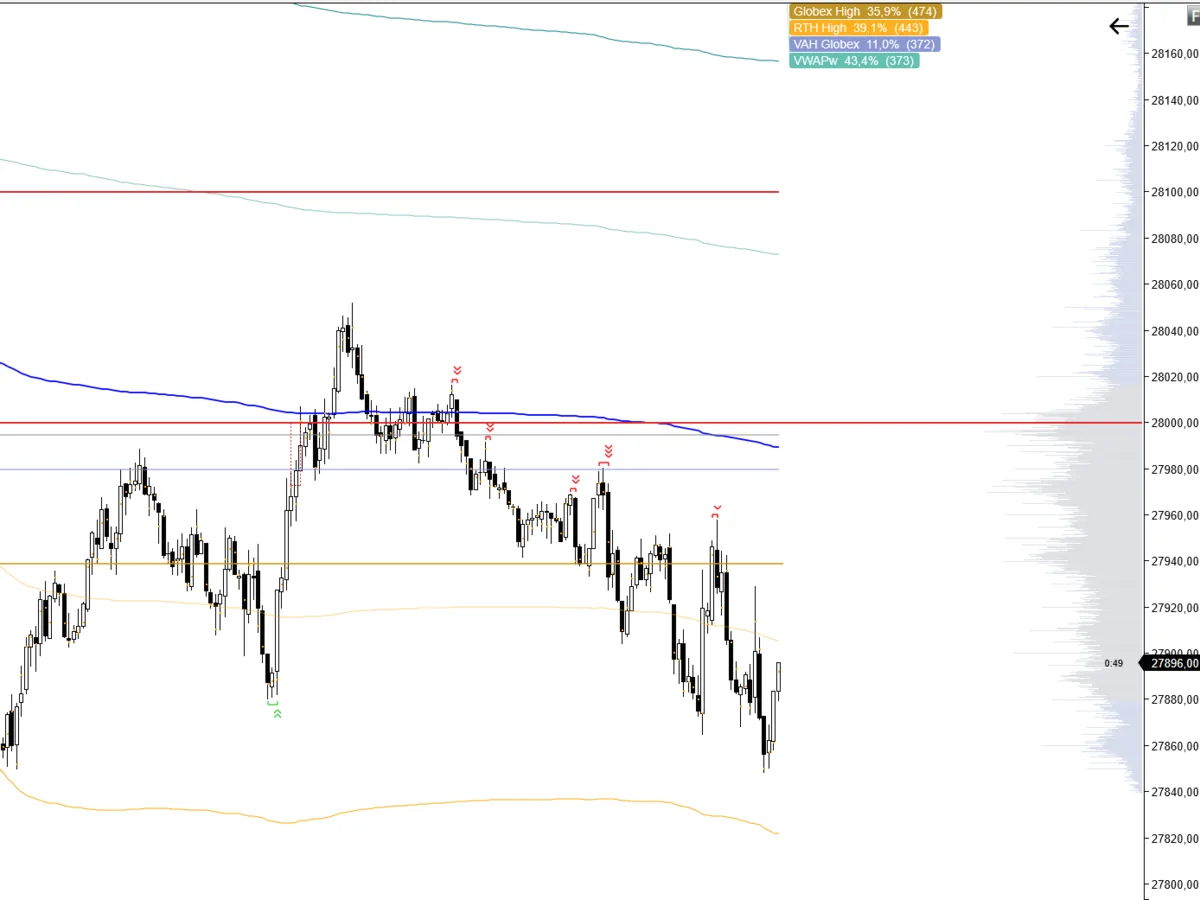
A NinjaTrader 8 chart with volume profile, VWAP and session levels.
NinjaTrader is a Windows desktop platform specialized in futures, with charting, backtesting and simulated trading free with no time limit. For real order flow (delta, footprint, market depth) you need the Order Flow+ package, which unlocks when you fund an account on any of its three plans (Free, $99/month or $1,499 one-time). It's the platform I use to read volume and delta with real tick data; its downsides are the learning curve and no native Mac support.
People often ask me which platform I use. The short answer: NinjaTrader for everything involving real volume, delta and footprint in futures, and TradingView for quick analysis across many markets. In this review I'll tell you what NinjaTrader does well, what it really costs, what you need for order flow, and where it falls short.
If you're new to order flow, read the Order Flow guide and why TradingView's delta isn't a real delta first: they explain why the platform choice matters so much when you work with volume.
Table of Contents
What is NinjaTrader?
Definition
NinjaTrader is a desktop trading platform specialized in futures that combines advanced charting, backtesting, simulation and order flow tools with live trading through its own brokerage.
The current version is NinjaTrader 8, a Windows application. It has three uses worth separating:
- ▸Analysis and practice: charting, strategy backtesting and a simulated account. Free with no time limit, no funding required.
- ▸Order flow and real-time data: the Order Flow+ package, real-time market data and Market Replay unlock when you fund an account.
- ▸Custom development: NinjaScript, its C#-based programming language, lets you build indicators and strategies. It's the ecosystem where thousands of third-party tools live, mine included.
Why I use NinjaTrader (and my relationship with it)
My analysis is built on the Wyckoff Method, Volume Profile and order flow. All three have one thing in common: they need real volume. And not just any volume — to read absorption, initiative or delta divergences you need to know whether each contract executed at the Bid or at the Ask.
That's where NinjaTrader makes the difference compared with a general-purpose platform. It works with tick-by-tick futures data, so you see delta and footprint as they actually happened, not an approximation.
For full context, my relationship with NinjaTrader is twofold:
- ▸I use it in my own volume and order flow analysis.
- ▸I develop indicators for its ecosystem, such as the Price & Volume Suite, which runs on TradingView and NinjaTrader 8.

Try it at no cost before deciding
NinjaTrader's charting, backtesting and simulated account are free with no expiry date. It's the sensible way to check whether it fits you before funding anything.
#ad #NinjaTraderPartner
How much does NinjaTrader really cost?
NinjaTrader has three plans. What changes between them is the per-contract commission, not the features: all three give you the same platform.
| Plan | Fee | Standard contract (per side) | Micro (per side) |
|---|---|---|---|
| Free | $0 | $1.29 | $0.39 |
| Monthly | $99/month | $0.99 | $0.29 |
| Lifetime | $1,499 one-time | $0.59 | $0.09 |
Source: NinjaTrader's official pricing page (Europe), checked on October 11, 2026. Prices may change; check them before deciding.
On top of those commissions there are costs worth keeping in mind:
- ▸Exchange, clearing and NFA fees, added to NinjaTrader's commission. The official page lists, among administrative fees, a $0.19 clearing fee per contract and a $0.25 per-contract Rithmic order routing fee.
- ▸Inactivity fee on the Free plan only: $35 if you log in during the month but make no live trades ($25 on plans prior to June 20, 2025).
- ▸What requires a funded account: real-time market data, Order Flow+ and Market Replay.
Rule of thumb: if you only analyze and practice, you pay nothing. If you trade little, the Free plan is usually enough. Paid plans only pay off with high contract volume, because the difference is in the per-trade commission.
Order flow in NinjaTrader: what Order Flow+ includes
Order Flow+ is NinjaTrader's order flow toolset. It's what turns the platform into more than a charting program. It includes, among other tools:
- ✓Volumetric bars: the footprint, showing volume traded at the Bid and at the Ask at each price level of the candle
- ✓Cumulative delta: aggressive buying and selling pressure across the session, to spot divergences with price
- ✓Market depth map: how resting limit orders in the book evolve over time
- ✓Order flow VWAP with deviation bands
- ✓Volume profile on the chart
It used to require buying the Lifetime license. Today, according to the official pricing page, Order Flow+ unlocks when you fund an account on any of the three plans. That's the change that has made real order flow most affordable for retail traders.

You can see the difference in the image. NinjaTrader's delta is calculated from the real order cross; TradingView's, by its own documentation, is an estimate based on candle direction. I cover it in detail in TradingView Delta: why it's not a real Delta.
NinjaTrader vs TradingView, Sierra Chart and ATAS
There's no perfect platform, only the right one for each job. This is how I see the four I'm asked about most:
| Platform | Strength | Weakness | Best for |
|---|---|---|---|
| NinjaTrader | Real futures volume: Volume Profile, delta and VWAP on the chart, free backtesting and simulation, huge indicator ecosystem | Windows only, learning curve | Futures traders whose analysis is built on volume (Wyckoff, Volume Profile) |
| TradingView | Runs in the browser, covers almost every market, giant community | Its delta is an estimate, no footprint with real Bid/Ask | Multi-asset analysis and swing trading |
| Sierra Chart | Very lightweight and precise, a microstructure classic | Dated interface and demanding setup | Technical users who prioritize performance |
| ATAS | Built for order flow: footprint, tape and order book in great detail | Pricier for real-time trading (Pro plan from €39.95/month billed yearly; the free plan has futures data delayed 15 minutes), needs an external data feed and is more technical | Pure order flow traders: footprint, tape and order book |
My take: TradingView and NinjaTrader don't compete, they complement each other. I use TradingView to scan many assets quickly and NinjaTrader when I need to see what's happening inside the candle. If you trade pure order flow (footprint, tape and order book), ATAS is the specialist. If volume is the foundation of a broader analysis, like Wyckoff or Volume Profile, NinjaTrader is the better fit: that's why I chose it, along with its indicator ecosystem and the ability to practice for free.
How I set it up for Wyckoff and volume
This is the order I follow to get the platform ready for Wyckoff and volume analysis:
Start in simulation
Install NinjaTrader 8 and work with the simulated account. Learn to move around the platform, build workspaces and place orders without risking money.
Clean candlestick chart with real volume
Candles plus volume in a lower panel. In futures, volume is the real volume of the centralized market — unlike spot Forex, where you only see your broker's volume.
Add the volume profile
Volume Profile shows where the most volume traded: value areas, POC and low-volume nodes. It's the foundation for reading Wyckoff ranges by price, not just by time.
Turn on order flow when you need it
With Order Flow+, add volumetric bars and cumulative delta. Use them to confirm what you see in the structure: a Spring with absorption at the Bid doesn't read the same as one without it.
Train with Market Replay
Market Replay plays back past sessions tick by tick. It's one of the most effective ways to train volume reading in real conditions without waiting for the market to hand you the scenario.
To speed up steps 2 and 3, the Price & Volume Suite I developed marks price pivots and volume levels directly on the NinjaTrader 8 chart (and on TradingView too).
Don't have NinjaTrader 8 yet?
My indicators run on NinjaTrader 8. Download the platform, start in simulation and add the indicator in a couple of minutes.
#ad #NinjaTraderPartner
NinjaTrader's limitations
No platform is perfect, and these are NinjaTrader's real downsides you should know before choosing it:
What I don't like about NinjaTrader
- No native Mac support. It's a Windows application. On a Mac you'll need virtualization or a remote Windows server, and NinjaTrader doesn't officially support it.
- The learning curve is real. It has a huge number of options. The first days can feel overwhelming if you come from TradingView.
- The best features require a funded account. Real-time data, Order Flow+ and Market Replay need a funded account. Without one you get charts and simulation, but not order flow.
- Inactivity fee on the Free plan. If you open the platform and make no live trades all month, it charges $35.
- It's futures-oriented. If you invest in stocks long-term or follow many different markets, another tool will probably suit you better.
Who is NinjaTrader for (and who isn't it for)?
It fits you if
- You trade or want to trade futures (indices, commodities, currency futures).
- You work with volume, Volume Profile or order flow and need real Bid/Ask data.
- You want to practice in simulation on a professional platform without paying.
- You want to use third-party indicators or code your own in NinjaScript.
It probably doesn't if
- You're on a Mac and don't want to deal with virtualization.
- You swing trade stocks or many assets and price plus total volume is enough.
- You want a very simple tool to start from scratch.
Key takeaways
- • NinjaTrader is a Windows desktop platform specialized in futures
- • Charting, backtesting and simulation are free with no time limit
- • Order Flow+, real-time data and Market Replay unlock with a funded account, on any plan
- • Three plans: Free ($0), Monthly ($99/month) and Lifetime ($1,499); the per-contract commission changes
- • Its big advantage is delta and footprint from the real Bid/Ask cross; its downsides, Windows and the learning curve
A platform doesn't make you a better trader. What makes the difference is knowing how to read what it shows. If you want to learn to interpret volume and price inside the Wyckoff structure, that's what I teach in the Advanced Wyckoff Course.
Download NinjaTrader and try it in simulation
If you want to see delta and footprint with real data for yourself, NinjaTrader is the platform I use for it.
#ad #NinjaTraderPartner
Rubén Villahermosa receives compensation from NinjaTrader for visits that reach its website through the links in this article. Views are their own; individual results may vary. This content is for educational purposes only and does not constitute investment advice. Futures trading carries substantial risk of loss. Simulated trading is hypothetical and not indicative of real results. Accurate as of posting. #ad #NinjaTraderPartner
Frequently asked questions
Is NinjaTrader free?
Yes for analysis and practice: charting, backtesting and simulated trading are free with no time limit and no funding required. To trade live, get real-time market data, or use Order Flow+ and Market Replay, you need to fund an account. The Free plan has no monthly fee but charges a higher per-contract commission than the paid plans.
How much does NinjaTrader cost?
There are three plans: Free ($0 fee), Monthly ($99/month) and Lifetime ($1,499 one-time). What changes is the per-contract commission: on standard contracts $1.29, $0.99 and $0.59 per side respectively; on micros $0.39, $0.29 and $0.09. Exchange, clearing and NFA fees apply on top. Figures checked on NinjaTrader's official website on October 11, 2026.
What does NinjaTrader Order Flow+ include?
It's NinjaTrader's order flow toolset: footprint-style volumetric bars, cumulative delta, a market depth map, VWAP and volume profile, among others. According to the official pricing page, Order Flow+ unlocks when you fund a live account, on any of the three plans.
Does NinjaTrader work on Mac?
Not natively. NinjaTrader 8 is a Windows application. On a Mac you can run it through virtualization (such as Parallels) or a remote Windows server, but NinjaTrader doesn't officially support it, so any performance issue is on you.
Is NinjaTrader better than TradingView?
It depends on the job. TradingView is better for analyzing many markets from the browser, with a huge community of indicators. NinjaTrader is better for futures and order flow: it measures delta and footprint with the real Bid/Ask cross, while TradingView's delta is an estimate based on candle direction. Many traders use both.
Does NinjaTrader charge an inactivity fee?
Only on the Free plan: if you log in to the platform but make no live trades during the month, it charges $35 ($25 on accounts with pricing plans prior to June 20, 2025). The official page doesn't list this fee for the Monthly and Lifetime plans.


